Export packs a set's finished ads into ZIP files with a CSV manifest, ready for an ad server, a trafficking sheet, or a client hand-off.
Availability: personalized creative sets are rolling out to teams gradually. If you do not see Sets in the brand sidebar, your team does not have them yet. Contact support to ask for access.
1. Start an export
- Open the set and choose Export in the header. It is available once at least one ad is ready or needs review.
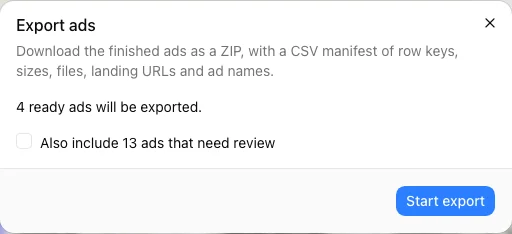
- The Export ads dialog says how many ads go in: 118 ready ads will be exported.
- Optional: tick Also include 2 ads that need review. Otherwise ads that need review are left out.
- Choose Start export.
The dialog shows progress, such as Added 60 of 118 ads…, and then Your export of 118 ads is ready. The export runs in the background. If you close the dialog, choose Export again and start the same export to pick up where it is.
2. Download the files
- Download ZIP (118 ads) — the ads in one archive.
- Download part 1 (… ads), Download part 2 (… ads), and so on — a large export is split into parts of up to about 45 MB each.
- Download the CSV manifest — one line per exported ad.
Static ads are JPEG files at each design's exact size. Files are named after the row's key and the size, such as SKU-1042_300x250.jpg. A row without a key uses its row number, such as row-5_300x250.jpg.
If some ads could not be added, the dialog says so: 2 ads couldn't be added: they were excluded or their files were missing when their turn came.
The CSV manifest
| Column | What it holds |
|---|---|
row_key | The row's key column value |
size | The ad's size |
file | The file name inside the ZIP |
landing_url | The row's landing URL, when the mapping fills it |
ad_name | The row's ad name, when the mapping fills it |
status | The ad's status |
The manifest opens safely in spreadsheet apps: a value that a spreadsheet would run as a formula is written as plain text.
How long downloads last
- Download links are made when you select them and expire after a short time. Download from the dialog instead of sharing a link.
- An export is kept for 7 days. After that, start a new export.
- If nothing in the set has changed, a new export reuses the last one.
- One export runs per set at a time. Starting one with other options while another runs shows An export with other options is still running for this set.
To download a single ad, use Download in its … menu.
Rich media sets
A rich media set exports one ZIP per row inside the archive: each row's self-contained HTML5 bundle, ready to upload to an ad server, plus the CSV manifest. See Personalized rich media sets.